
Great for choosing clothes for your dog or cat, too
Kurinuki Try-On Camera works with photos of dogs and cats, not just people. Erase the clothing from a pet's photo to make a transparent hole, then hold it up to clothing in a shop or a product photo online to get a sense of the look and fit. See the home page for an overview.

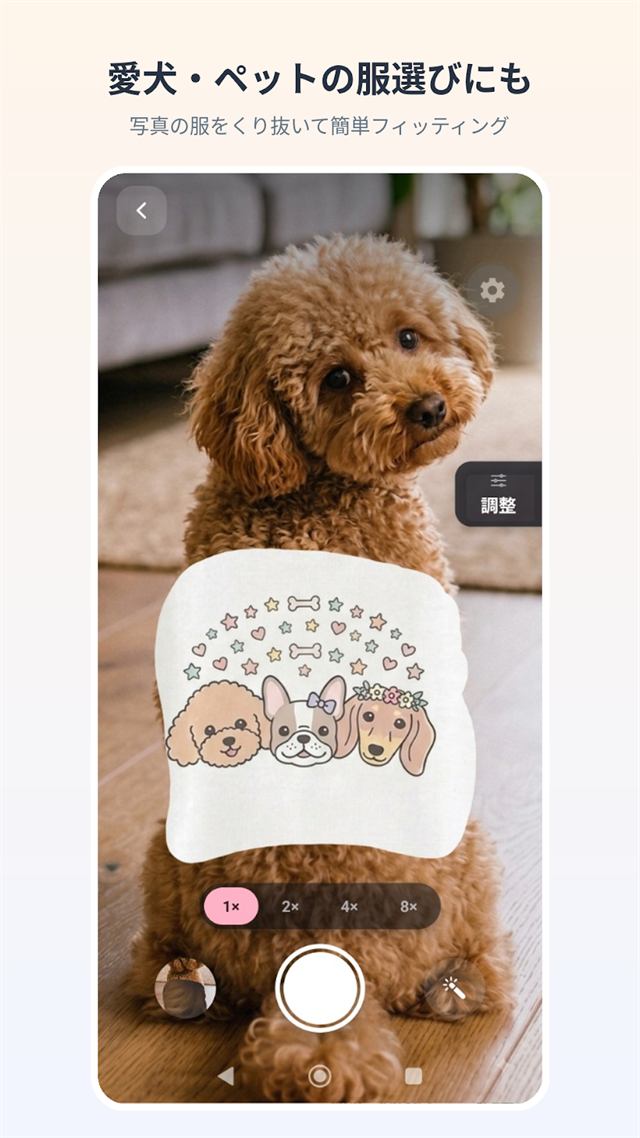
Use "Trace to erase" wherever there's fur
On a pet's photo, "Auto-select the clothes" and "Tap to erase" don't work well. Instead, use "Trace to erase" and trace over the clothing with a finger. Erase too much and "Restore" brings it back.
Why AI and tap-erase struggle here
- "Auto-select the clothes" is built to find human clothing, so it doesn't recognise clothes on a dog or cat.
- "Tap to erase" erases whatever is connected to where you tapped and close in colour. Fur has no clear colour edge, so the whole body gets erased along with the clothes.
This isn't something a setting can fix — it's just how those tools work. "Trace to erase" is the reliable choice around fur. Related questions are in the FAQ, too.
The steps are the same as for a person
- Try it in a shop: pick a photo of your pet → erase the clothing with "Trace to erase" → "Apply" → hold it up to the garment in the shop and shoot.
- Try a garment online: pull the clothing out of a product photo (one with a person or model wearing it works best) → "Apply" → pick a photo of your pet as the backdrop, line up the garment, and shoot.
See the full how-to guide for details.
A note
What you see is a visual overlay — it doesn't guarantee the actual fit or how something would really look worn. Please confirm the product's size chart and your pet's own measurements before making a purchase decision.
Start with just one outfit for your dog or cat
For Android · Free to start